
Settings
Every preference in Graphium lives in one modal: click Settings at the bottom of the sidebar. The modal has seven tabs — Display & Language, Storage, AI, Grounding data, Knowledge, Usage, and About — arranged in setup order, so a first-time setup reads top to bottom and left to right. This page is a map of every tab; the deep-dive pages linked from each section explain the workflows in full.
Platform availability
Some groups only appear on certain platforms: folder pickers, sharing, mobile inbox receiving, and update checks need the desktop app. Each table below notes these cases.
Display & Language
How Graphium looks and reads.
| Group | What it does |
|---|---|
| Language | Switch the UI between English and 日本語 (Japanese). |
| Reading font | Set Latin and Japanese fonts independently — the Latin font applies to alphanumerics, the Japanese font to kana and kanji. |
| Zoom Added in v0.84.0 (2026-09-30) | Make the whole window smaller or larger. In the desktop app you pick a level from 50% to 150% and it applies immediately (Graphium remembers it); in the browser this row just points you to your browser's own zoom. |
| Start new notes on A4 width Added in v0.85.1 (2026-10-01) | When on, a new note you start yourself opens on A4 width. It covers blank notes (the sidebar's new note, a new note inside a folder, and a note created from an @ mention), notes from a template, imported notes (Word, Markdown, URL, PDF), and notes made from a row of a plan table. A template that sets its own width keeps it. Derived notes follow their source note, notes forked from a share follow the person who shared them, and existing notes never change. Off by default, saved with Save, and shown only on a desktop-sized window. |
| Also switch existing notes to A4 / Switch all A4 notes back to standard Added in v0.85.1 (2026-10-01) | Two buttons right below the setting above, shown only on a desktop-sized window. Each asks for confirmation, then rewrites the width of your notes one by one while showing progress (for example 120 / 300 notes) with a Stop button; press the button again to continue from where it stopped. Only the note width is rewritten: the modified date shown in the list, its order, the history and everything else in the note stay as they are. Notes set to full width and notes in the trash are left as they are (archived notes are included). Notes that are open are updated on the spot. The first button switches notes that are not on A4 to A4; the second removes A4 from every A4 note and returns it to the standard width. |
| Provenance label names | Rename the provenance labels shown throughout the app; see Labels & provenance. |
Latin font options: Default (Inter), Atkinson Next + Inter numerals (dyslexia-friendly), Atkinson Next only (digits with slashed 0), and Lexend (reading-speed optimized / NASA study). Japanese font options: Default (OS system font), Zen Kaku Gothic New (relaxed body gothic), and BIZ UDPGothic (Japanese UD gothic).
Reading colors Added in v0.34.0 (2026-08-13) sits next to the fonts: "Choose a preset for text and paper colors." The presets are Default (soft green paper), High contrast (darker text) — body-text contrast goes from about 14:1 to 18:1 — and White paper (pure white page), which removes the green tint from the page.
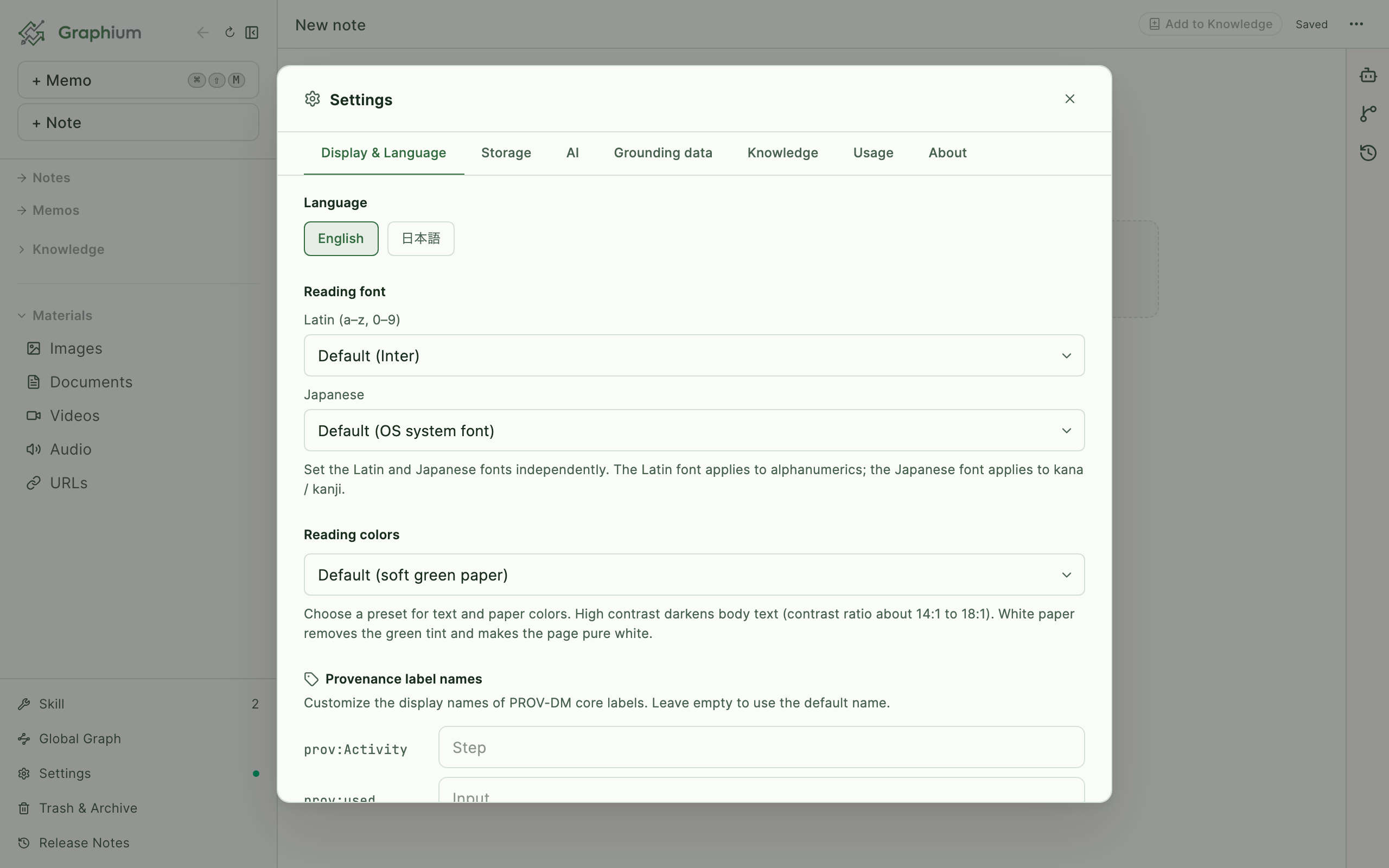
Under Provenance label names — a collapsed group by default; press Details next to a heading to expand any long description — five labels are renameable — the defaults are Step, Input, Tool, Parameter, and Output — and each row shows its underlying PROV-DM role (prov:Activity, prov:used, prov:Entity, prov:wasGeneratedBy). Leave a field empty to use the default; Reset to defaults clears all custom names at once.
Storage
Where your notes live and how they move between devices. Full details in Storage & sync. The top two groups are open by default; the rest sit inside two collapsed bundles you expand as needed.
| Group | What it does |
|---|---|
| Where your notes are saved | Desktop only — change the folder where notes, media, and knowledge are stored (point it at a Dropbox/Drive/OneDrive folder to sync without OAuth). |
| Export and backup | Download all notes as Markdown files, or a raw-data JSON backup covering every note, knowledge, and skill document. |
| Share with other people | A collapsed group holding three settings: Your name (display name and email, used as the author on shared notes and provenance entries), Share with your team (desktop only — pick a shared folder, e.g. lab NAS or synced folder, plus a blob folder for large binaries, with a Test connection round-trip check), and Send from your phone Added in v0.23.1 (2026-07-29) (the desktop half of phone capture: a QR code that opens Graphium on your phone, the Inbox folder picker for the synced folder that receives captures, and the Keep processed files in _imported/ option — see Mobile capture). |
| Advanced | A collapsed group holding Search index Added in v0.39.0 (2026-08-17) — the on-device full-text index over note bodies, knowledge pages, and asset text (image OCR, URL excerpts, PDF text) that ⌘K search and the AI chat's cross-search use. It shows how many sources and passages are indexed, and Rebuild index clears and rebuilds it if results ever look wrong. Browse contents opens the index itself: Passages lists every indexed source — open one to see the passages it was cut into and the exact terms each passage was indexed under (how a Japanese sentence was segmented) — and typing a word runs a test search; Vocabulary lists every term in the index with the number of passages containing it, filterable. It never writes to your notes. |
WARNING
Changing Where your notes are saved does not move existing notes automatically — copy the old folder's contents into the new one first, then restart Graphium.
AI
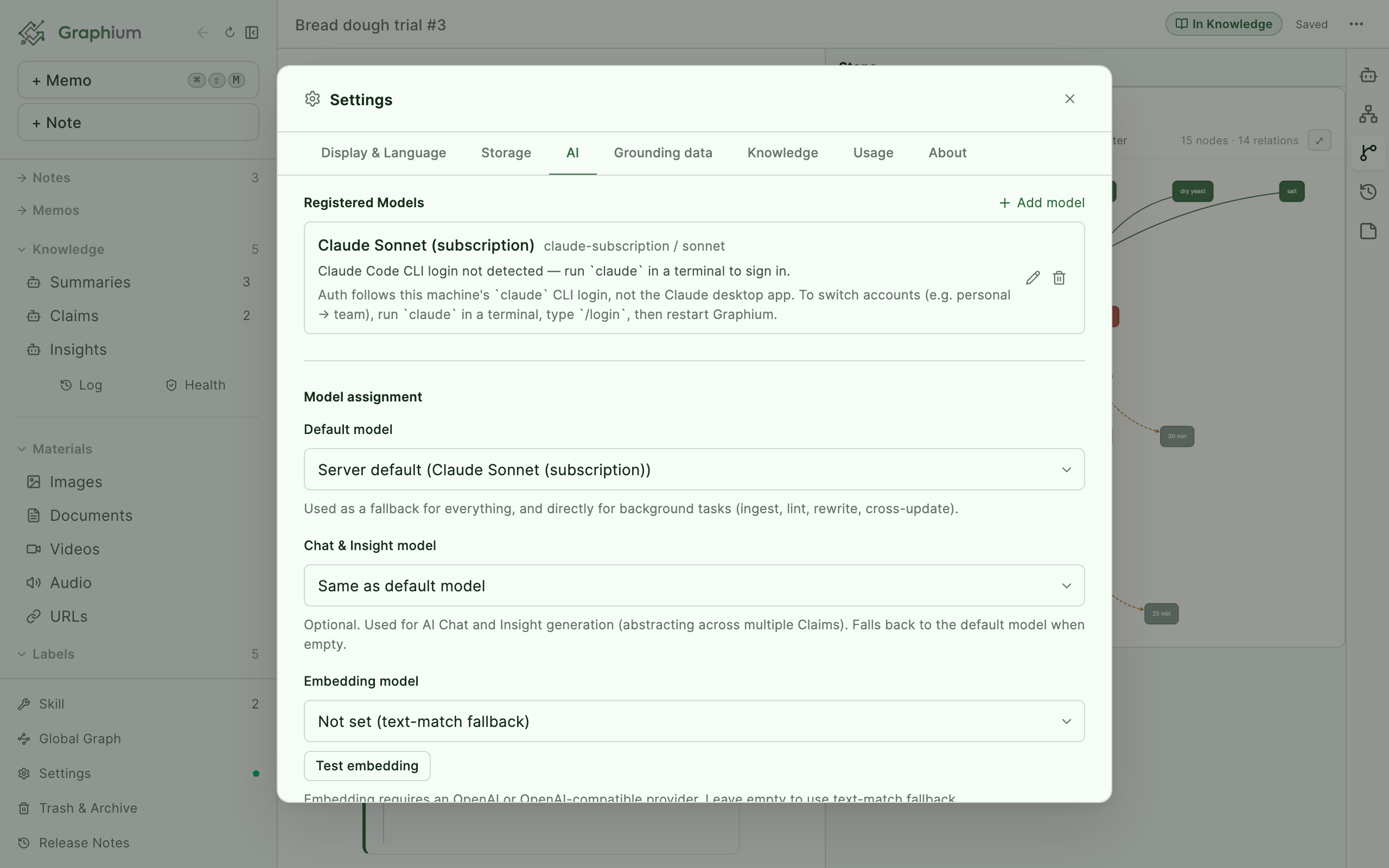
Everything AI-related, ordered as a setup flow: a status banner first, then register models, then optional extras, then two collapsed bundles for the settings you touch less often. Full walkthrough in AI setup.
| Group | What it does |
|---|---|
| Status banner | AI is ready (shows the model in use) or AI is not set up yet with a Register an AI shortcut, depending on whether any model is registered yet. |
| Registered Models | Add and manage models — Anthropic, OpenAI, Google Gemini, OpenAI-compatible endpoints, or a GitHub Copilot subscription — with optional per-model pricing. Once at least one model is registered, the list is collapsed to a one-line list of names; click the heading to open it. |
| Model assignment | Always shown right below the model list: Default model (used by every AI feature whose own model is left empty), Chat model, and Embedding model (with a Test embedding check). Each model's Details lists which features use it and what it falls back to when left empty. |
| Voice notes | Desktop app only, right below the model assignment and shown even before any model is registered (transcription runs on this computer). The speech model, language, frequent terms, Transcribe while recording, and the AI model for clean-up and summaries; see Voice notes. |
| Knowledge | Settings for ingest and upkeep that are not experimental: |
| Write a summary page per source Added in v0.89.14 (2026-10-20) | Off by default for everyone. When on, ingesting a PDF or URL also writes one Summary page for that document — one extra AI call per source. Summaries follow the same rules as Topics (every sentence cites its source) and can be source-checked; re-ingesting the same document rewrites its existing Summary. Notes and Word files never get one. |
| Run full (AI) analysis in automatic checks Added in v0.79.0 (2026-09-18) | Switches the checks that run on their own (right after ingest, and every 24h at startup) from a mechanical-only Quick check to a Full (AI analysis) check — off by default, so the AI is only called automatically once you turn this on. Turning it on doesn't change who fixes, merges, or links anything found — that's still always you. See Log and Upkeep. |
| Connect external tools (MCP) | A collapsed group holding MCP Servers Added in v0.13.6 (2026-06-04) — connect external tool servers directly: Paste JSON from a server's README, configure one by hand with Manual, or pull candidates From registry. The collapsed line shows how many servers you have. |
| Experimental features Added in v0.92.0 (2026-10-20) | A collapsed group at the very bottom. When any of them is on, the collapsed line names it (for example On: world grounding, claims, insights). It holds: |
| Use world grounding Added in v0.75.0 (2026-09-16) | Master switch for world grounding — off the first time you use Graphium, on if you've used it before. Turning it off hides grounding buttons and columns everywhere; results already saved on notes are kept. |
| World grounding | Turn on Auto-ground new knowledge and optionally set a dedicated grounding model; see World grounding. |
| Auto-check sources | Directly below auto-grounding: turn on to check new or updated Claims and Topics against their sources one at a time in the background (off by default); see Automatic source check. |
| Let the AI search again on its own Added in v0.93.0 (2026-10-21) | Off by default. When on, in chats grounded with Internal or External (and in chats without a note open), the AI can search your notes, topics, claims and materials again with different words, and read a whole page when a passage isn't enough. Replies take longer and use more of your AI quota; it only reads. See Letting the AI search again. |
| Use claims Added in v0.78.0 (2026-09-17) | Master switch for claims — off the first time you use Graphium, on if you've used it before. Topics (built directly from your sources) are always on; claims are a Graphium-specific extension that takes every proposition a note or document carries (such as "X happens when Y"), one proposition per claim, written without experiment-specific details so it still makes sense in another context. Turning claims off skips claim extraction on ingest (the topic stage still runs); claims already created are kept and stay visible if any exist. Turning claims off also turns insights off, since insights are built from claims. |
| Use insights Added in v0.75.0 (2026-09-16) | Master switch for insights — off the first time you use Graphium, on if you've used it before, and disabled while Use claims is off. Turning it off hides insights from the sidebar and lists; insights already created are kept. |
| Insight discovery Added in v0.45.0 (2026-08-25) | Insight model (optional, falls back to the chat model) with a Test insight model check, then Scans per ingest (max) — how many LLM calls Insight scanning may spend each time a note is added to Knowledge (default 3; 0 skips scanning at ingest). See Knowledge layer. |
| Connect with Asterism | Hands claims to Asterism (a knowledge graph) so it can find observations that break a rule. Off by default. |
In the browser version, where there is no backend, this tab shows an upgrade notice instead. MCP servers come in two types — Local (launched and managed by Graphium; desktop app only) and Remote (connects to an already-running server by URL).
TIP
Adding a web-search MCP server (e.g. Tavily) lets External grounding search the live web with any model — see AI chat and Ask.
Grounding data
A browser for the knowledge base that world grounding checks against. It starts empty and grows on its own: whenever a check misses the KB, the model's judgment is cached here and reused, so checks get faster and cheaper over time.
| Group | What it does |
|---|---|
| Entry list | Search and filter all KB entries; each shows a seed badge (curated, bundled) or model badge (cached from a model judgment). |
| Per-entry delete | Remove a single cached entry; seed entries cannot be deleted from the UI. |
| Clear sedimented entries | Bulk-remove all model-cached entries while keeping the bundled seed set. |
Knowledge Added in v0.81.1 (2026-09-18)
The editable Knowledge Schema lives in the sidebar's Skill list rather than this tab. It is one built-in document, excluded from Knowledge counts, search, and graphs. On first creation only, Graphium saves the default body in the current UI language; later UI language changes do not translate or overwrite it. Open the Schema and use the confirmed language-switch action when you deliberately want to replace it with the other bundled language default. Its saved rules apply to later Topic, Answer, and Claim generation; changing, switching, or resetting it does not automatically regenerate existing pages.
Maintenance jobs for the Knowledge layer. These run LLM calls, so each job asks for confirmation and reports token cost on the Usage tab.
| Group | What it does |
|---|---|
| Connection Status | Shows the health of each backend component, with a Restart backend button on the desktop app. |
| Re-embed all Knowledge | Rebuilds the embeddings behind AI chat citation search — use it if citation lookup stops working. Graphium also checks (cheaply, without a full scan) whether the index still has any vectors from the currently selected embedding model, and shows a one-line notice here if it looks like the model changed and the index needs a rebuild — nothing rebuilds automatically, since it spends your embedding API budget. |
| Organize topics Added in v0.75.0 (2026-09-16) | Consolidates existing topics that name the same concept (wording variants, particle differences, over-fragmented per-case topics) and merges their pages. It only consolidates topic pages — it doesn't assign or reassign Claims to topics (changed 2026-09-17). Consolidated topics are sent to Trash, not deleted outright. |
| Assign topic types Added in v0.89.15 (2026-10-20) | Shown while some topics have no type. Sends the untyped topics' titles and one-line definitions to the AI, 50 per call (the call count is shown before you confirm), and writes back a type — concept, material, method / instrument, person / organization, or place — without touching the page body. Types drive the Type column of the Knowledge list and the "Topics: …" toggles in the global graph; you can change any topic's type on its banner. |
| Bulk regenerate Knowledge | Rebuilds existing Knowledge pages after you change prompts or models, with Target kinds filters (Topics / Claims / Insights — Summaries are no longer generated and are not a regenerate target), an optional model override, cancel support, and Retry failed only. Topics are rebuilt from their sources, so a batch that includes Topics issues one AI call per source, not one per page — the AI-call total is shown next to the target count, and confirmed before running whenever Topics are included. |
| Discover Insights from Claims | Scans your Claims cluster by cluster until every one has been in view at least once, pulling out the relationship patterns in them as Insights (Claims that share a pattern are folded into one). The number of LLM calls needed is measured from your corpus and shown before running; you can stop anytime. |
Usage
Added in v0.12.0 (2026-05-28)The AI Usage dashboard: token consumption per AI feature, so you always know what your setup costs.
| Group | What it does |
|---|---|
| Time range | Switch the Tokens over time chart between Day, Month, and Year granularity. |
| Totals | Total tokens and Estimated cost, computed from the per-model pricing you set on the AI tab. |
| By feature | Per-feature breakdown of which parts of Graphium consumed the tokens. |
| Currency | Display costs in USD or JPY with an editable 1 USD = ¥ exchange rate. |
| Recalculate cost | Recomputes the last 90 days of cost with the current per-model pricing. |
Subscription models are flagged separately — Subscription (no per-token cost) — since they don't bill per token. Usage tracking needs the desktop app.
About
The app's identity card.
| Group | What it does |
|---|---|
| About this app | Shows the app name and Version. |
| Updates | Desktop only — Graphium checks automatically on launch and every 24 hours, and Check for updates runs a check on demand — when a new version is found you can install it right there; see Updating. |
In the browser version, the Updates group simply notes that update checks are only available in the desktop app.